eduroam Deployathon
1. Intro
eduroam is short for “education roaming”. It is a global federation of academic institutions providing secure and seamless wireless internet access for students, faculty, and staff.
Download full presentation PDF
2. Workshop program
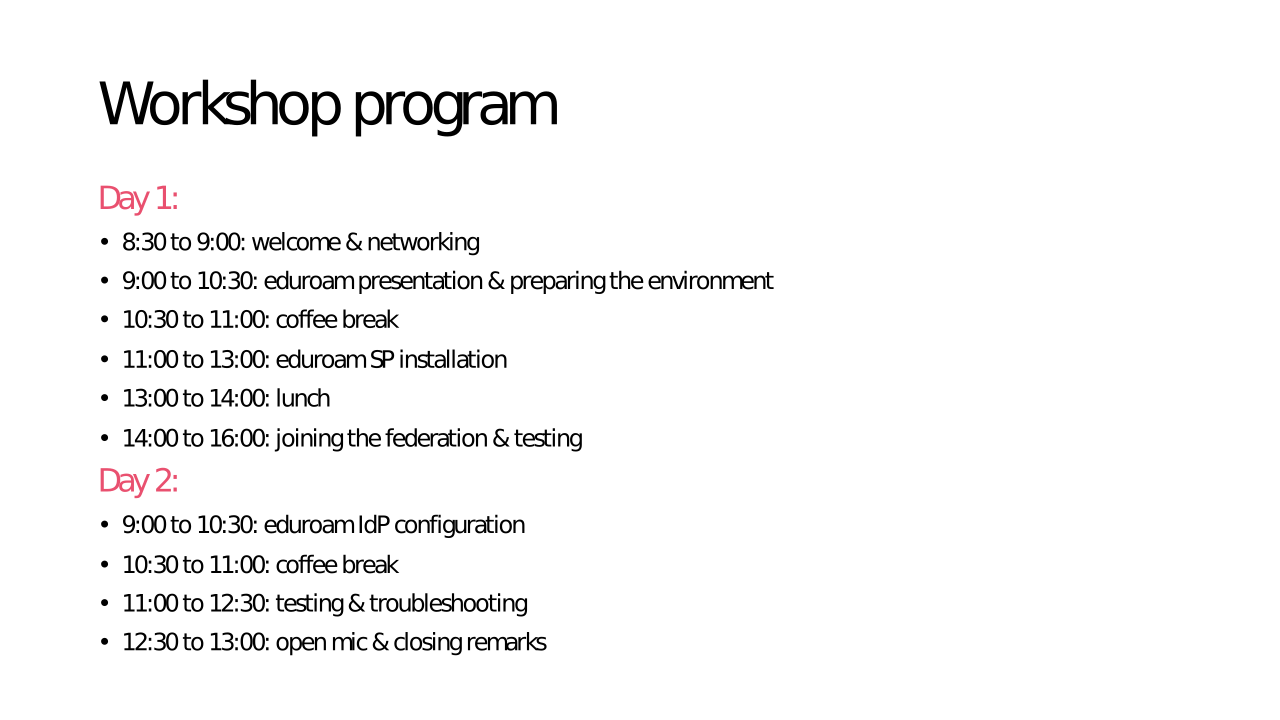
3. Prerequisites
The goal of the eduroam deployathon is to setup a working eduroam Service Provider (SP) instance and optionally an Identity Provider (IdP) instance as well.
An ** eduroam Service Provider ** or ** SP ** is an instance that offers eduroam as a service, i.e. publishing the eduroam SSID on premises and allowing people to connect. This can be anyone from libraries to coffee shops or train stations.
An ** eduroam Identity Provider ** or ** IdP ** is an instance that joins local users to the eduroam federation, allowing them to use the eduroam network anywhere they go. Only institutions in education or research may join the federation.
The prerequisites for this workshop are a machine with a fresh installation of EL9 (Rocky/Alma/RHEL), with static IP addresses and ports 1812/udp and 1813/udp open, this will be our RADIUS server. If you’re joining as IdP as well, you also need connectivity between your RADIUS server and LDAP server (OpenLDAP or Active Directory).
Now that we have a basic understanding of what eduroam is and what it does, let’s get to setting up our own instance. Bismillah, let us begin !